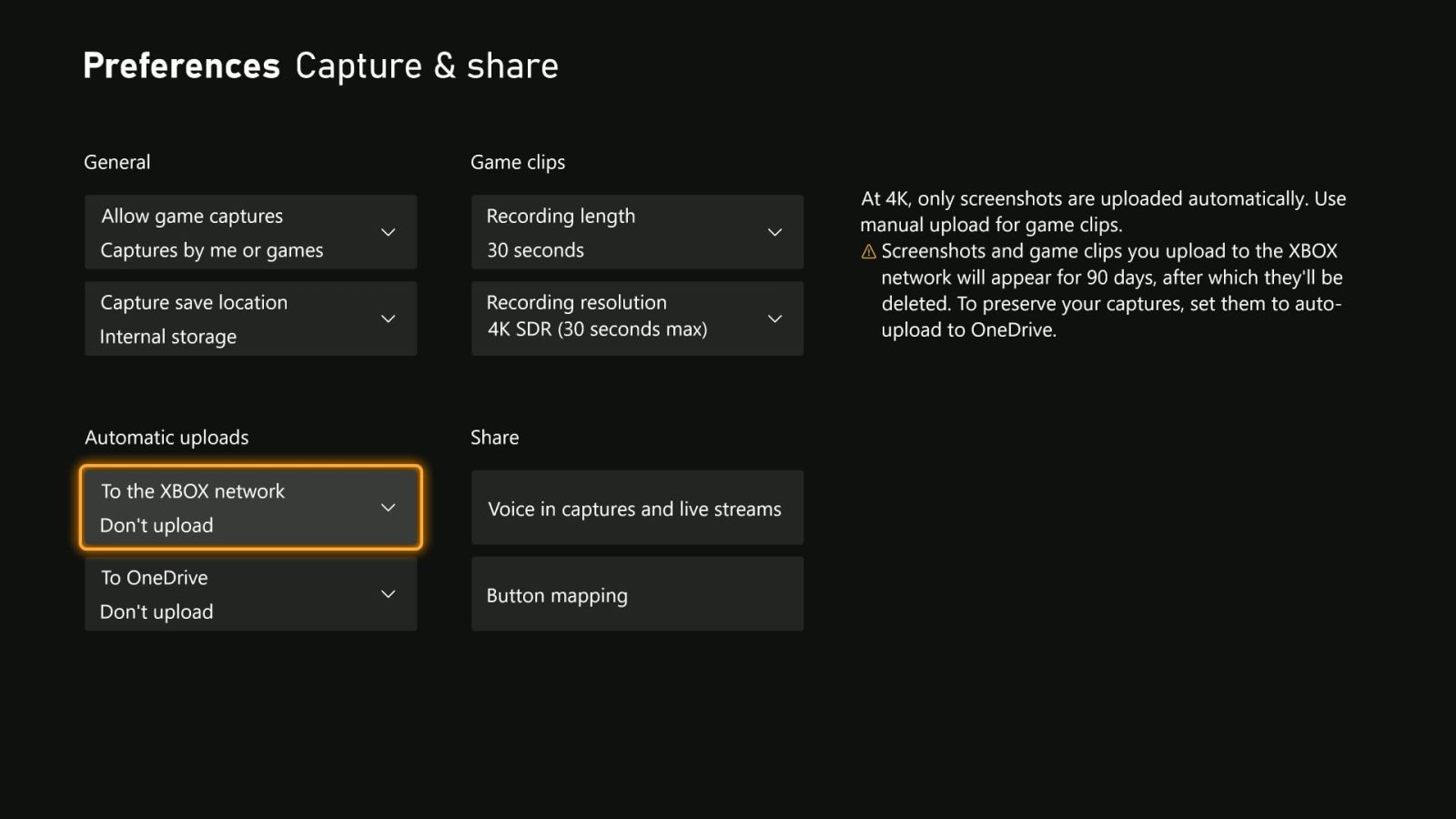
Reports of GTA 6 Xbox bans lasting two days have been spreading among Xbox Series X|S players since Friday, November 20, 2026, triggered by automatic clip and screenshot uploads. As highlighted by Pure Xbox and GamesRadar+, Microsoft’s automated content filters are flagging routine gameplay footage.
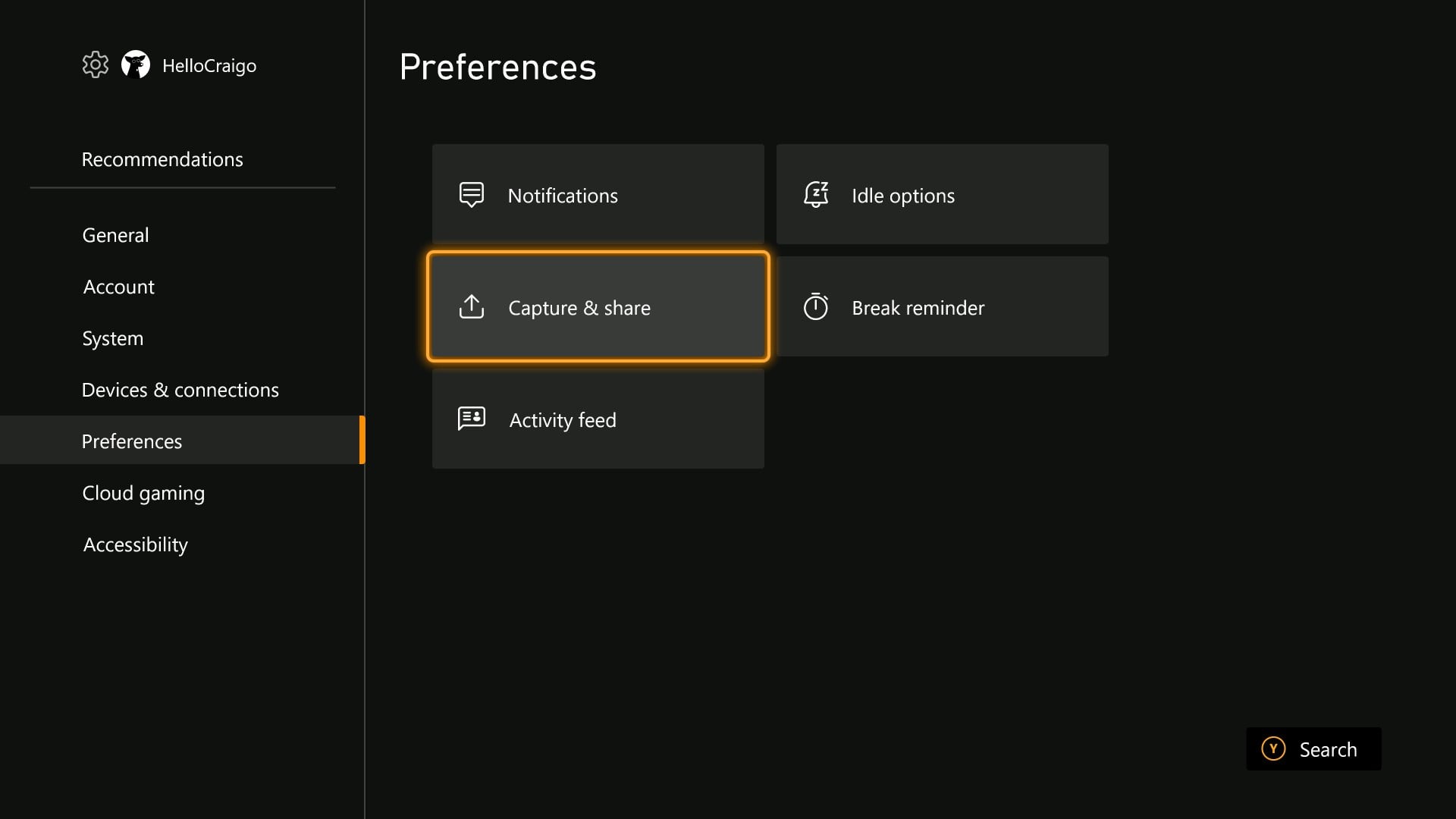 Navigate to Settings > Preferences > Capture & share on Xbox Series X|S to disable automatic uploads. © Microsoft Xbox / PureXbox
In short
- Reported penalty: automated 2-day Xbox Network suspensions blocking messaging, multiplayer, and media sharing.
- Root cause: Xbox consoles upload captures to the cloud by default, where automated moderation scans for adult content.
- Flagged scenes: even routine footage filmed on Vice City beaches with NPCs in swimwear has triggered strikes.
- Quick fix: switch automatic uploads off in your Xbox capture preferences before playing.
Why automatic suspensions are hitting Xbox players
On Xbox Series X and Xbox Series S, gameplay clips and screenshots are automatically uploaded to Xbox Network servers by default. Once uploaded, Microsoft’s automated moderation systems scan every file for excessive violence, hate speech, nudity, and sexual content under family-friendly guidelines.
Players on Reddit have warned that even standard coastal exploration around Vice City featuring beachgoers in swimsuits has led to immediate 48-hour suspensions. According to Pure Xbox, these automated rulings are also virtually unappealable, and GTA 6 includes mature sequences that can easily trip filters if captured by mistake.
How to avoid GTA 6 Xbox bans in four quick steps
To keep recording gameplay locally without risking a suspension, GamesRadar+ and Pure Xbox recommend turning off automatic cloud uploads right away:
- Press the Xbox button on your controller and open Profile & system > Settings.
- Select Preferences > Capture & share.
- Open the Automatic uploads menu for the Xbox Network.
- Set it to Don’t upload, and switch OneDrive to the same option if enabled.
Your clips and screenshots will still save locally on your console drive without being sent to cloud moderation servers. You can also check our GTA 6 Xbox Series X|S setup overview and our PS5 and Xbox install guide for more platform tips.
How to share gameplay clips safely on Xbox
Turning off automatic cloud syncing does not prevent you from recording highlights or taking screenshots while roaming Leonida. Every clip stays stored on your internal SSD, letting you review footage first before choosing what to upload manually or transfer to a USB drive.
Keep in mind that Microsoft enforces its Xbox Community Standards across all public captures regardless of a game’s M or PEGI 18 age rating. Avoiding automatic uploads ensures an accidental tap of the Share button during a crowded beach scene or cutscene will never trigger an unwanted account strike. Players can still export favorite moments safely to external storage or edit clips offline before sharing.
Warning
Disabling automatic uploads protects your account if you accidentally tap the Share button on your Xbox controller during mature scenes in GTA 6.
Frequently asked questions
How long do GTA 6 Xbox clip bans last?
Affected players report automated two-day suspensions restricting Xbox Network multiplayer, messaging, and media sharing.
Do you lose clips if you turn off Xbox automatic uploads?
No. Captures still save locally to your Xbox Series X|S storage; they simply stop uploading automatically to Microsoft servers.
Can you appeal a 2-day automatic Xbox capture suspension?
According to Pure Xbox, automated two-day capture bans are generally not appealable, making prevention in console settings the safest option.
Until Microsoft adjusts its automated moderation filters for mature open-world footage, disabling automatic cloud uploads remains the only reliable way to avoid GTA 6 Xbox bans on Series X and Series S. Players affected by these GTA 6 Xbox bans can also check their enforcement history on Microsoft’s support portal to review or appeal a strike.
What’s next?
Microsoft has not announced any adjustment to its automated clip moderation following the November 19 launch surge. Until then, switching off auto-uploads remains the safest safeguard against automatic clip strikes while you explore Leonida with our GTA 6 beginner tips.


Leave a Reply